
n8n
n8n is a source-available, node-based workflow automation tool that connects your apps, APIs, and services with advanced AI integration.
What Is n8n?
n8n (pronounced “en-eight-en”, short for nodemation) is a node-based, source-available workflow automation platform that empowers users to visually design, automate, and orchestrate complex business processes across hundreds of apps and APIs—including advanced AI-powered tasks. Unlike closed-source platforms, n8n offers both self-hosting for full control and privacy, and a managed cloud for ease of use.
Key Points:
- Source-available (fair-code): n8n License
- Drag-and-drop workflow builder
- Custom code support (JavaScript natively, Python via node)
- 500+ native integrations and HTTP Request node for any API
- Native AI nodes (OpenAI, Gemini, Claude, etc.)
- Agentic workflows, RAG, and prompt chaining
- Active open community
n8n Core Concepts
Nodes
Definition:
Nodes are the modular building blocks of n8n workflows, each representing a specific function or integration (e.g., sending an email, fetching API data, transforming JSON).
Types of Nodes:
- Trigger Nodes: Initiate workflows (webhook, schedule, app events).
- Action Nodes: Execute tasks (send message, update database, call API).
- Logic Nodes: Branching, merging, looping (if/else, switch, merge, loop).
- Code Nodes: Execute custom JavaScript (native) or Python (via node).
Node Examples:
- Webhook node (trigger on HTTP request)
- Google Sheets node (append row)
- Slack node (send message)
- HTTP Request node (integrate any RESTful API)
Learn More:
Workflows
Definition:
A workflow is a visual sequence of interconnected nodes, representing an automated process or business logic—essentially a flowchart for automation.
Features:
- Drag-and-drop visual editor
- Branching, merging, conditional logic, and looping
- Step-by-step debugging and execution logs
- Modular: Reuse workflows across projects
Examples:
- New form submission → Add to CRM → Notify via Slack → Send confirmation email
Learn More:
Credentials
Definition:
Securely stored authentication details (API keys, OAuth tokens, etc.) that allow nodes to access external services.
Key Features:
- Central management of credentials
- Encryption at rest and in transit
- Reusable across workflows
Examples:
- Google OAuth credential for Sheets
- Slack API token
- Custom HTTP header for REST APIs
Triggers
Definition:
Events that start workflows, such as incoming webhooks, scheduled times, or changes in connected apps.
Common Triggers:
- Webhook (receive data from forms, APIs, etc.)
- Cron (run at scheduled times)
- App-specific triggers (new row in Sheets, new deal in CRM)
Expressions
Definition:
Dynamic formulas for referencing, transforming, and mapping data between nodes—enabling complex automation and data manipulation.
Syntax Example:
{{$json["email"]}}to access an email field from previous node
Advanced Usage:
- Conditional logic
- Data formatting
- Calculations and string manipulation
Visual Workflow Editor
n8n’s visual editor is a node-based, drag-and-drop interface allowing users to design, trace, and debug workflows transparently.
Key Benefits:
- Easy to understand and modify
- Mix no-code automation with custom code
- Real-time execution and error tracing
Screenshot Example: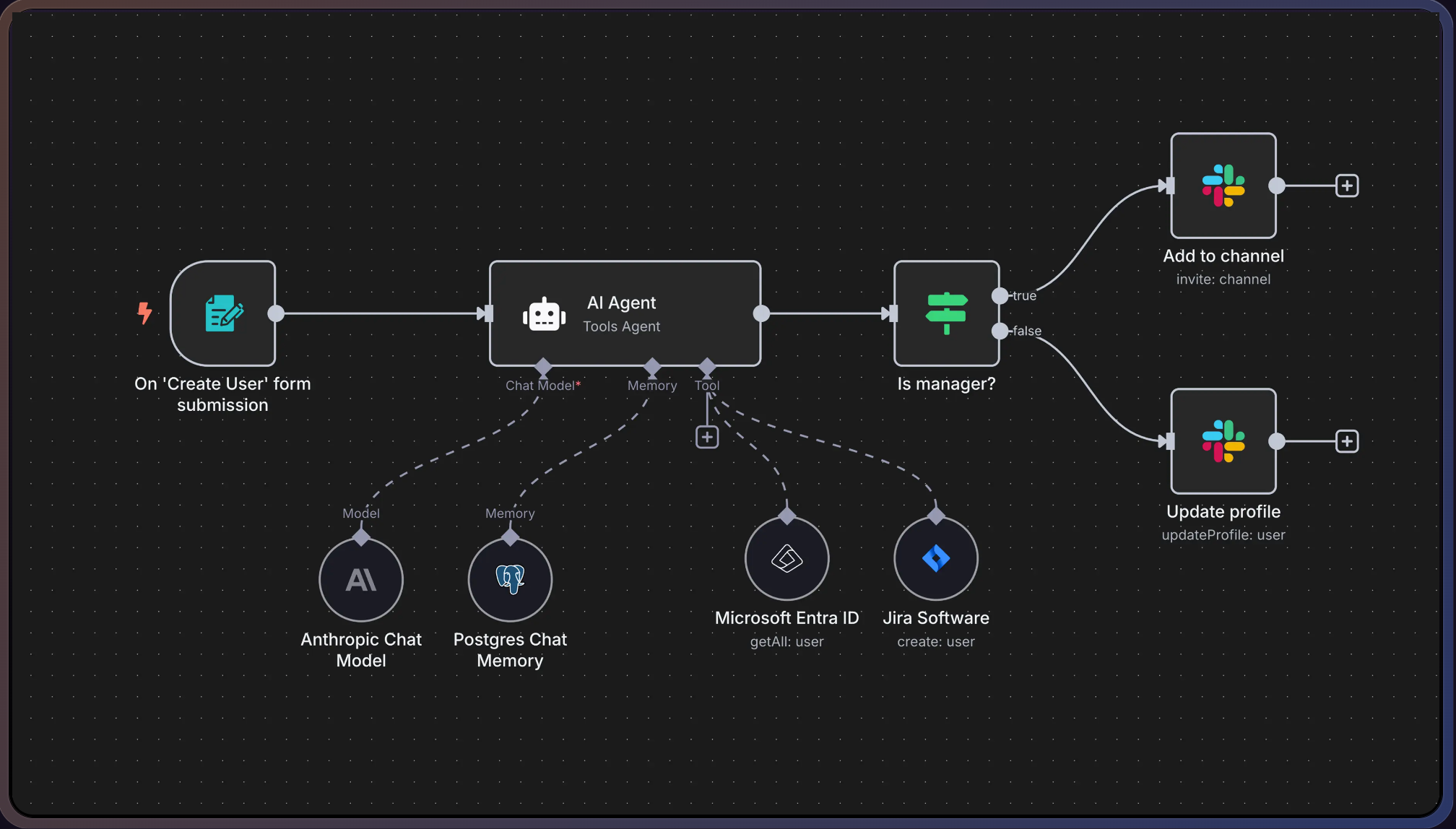
Learn More:
How Is n8n Used?
n8n is used to automate repetitive, multi-step business or personal tasks across apps and data sources, with both simple and complex logic.
Common Use Cases:
- Lead management: Capture forms, update CRM, notify sales, automate emails
- Data sync: Keep customer info, orders, or tickets synced across tools
- AI-powered processes: Chatbots, summarization, ticket classification, content generation
- Reporting: Aggregate analytics, compile reports, deliver notifications
- E-commerce: Order processing, invoice generation, shipping, customer alerts
- Support: Ticket routing, auto-assign, multichannel updates
- Project management: Sync tasks between Jira, Asana, Trello
- Web/data scraping: Extract, transform, and store information
- Smart home: Automate devices based on location or events
User Types:
- IT, DevOps, SecOps
- Agencies, marketing, sales, and support teams
- Developers and non-coders (thanks to the visual editor)
- Enterprises with privacy, compliance, or custom integration needs
- Individuals automating personal or smart home workflows
AI Integration in n8n
AI workflow automation in n8n leverages nodes for LLMs (OpenAI, Gemini, Claude, etc.), retrievers, and agentic orchestration, allowing you to automate unstructured data processing, intelligent routing, and advanced decision-making.
Key AI Features:
- Natural Language Understanding: Summarize, classify, or transform text using LLM nodes (n8n AI Docs)
- Retrieval-Augmented Generation (RAG): Combine LLMs with document retrieval for chatbots and internal search (Example RAG Workflow)
- Multimodal AI: Handle text, images, and documents (e.g., validate passport photos with Google Gemini)
- Human-in-the-Loop: Pause for manual approval within automated flows
- Multi-Agent Systems: Orchestrate multiple AI models, combine outputs, and make decisions
Benefits of AI Workflow Automation:
- Handles unstructured data (emails, docs, images, social posts)
- Automates tedious, error-prone tasks
- Scales with business growth
- Adapts to unexpected changes in data or process
- Provides predictive analytics and actionable insights
Features & Differentiators
| Feature | n8n | Zapier | Make (Integromat) |
|---|---|---|---|
| Visual Workflow Editor | Yes | Yes | Yes |
| No-Code Friendly | Moderate (advanced users) | Very High | High |
| Custom Code Support | Yes (JavaScript native, Python node) | No | Limited |
| Self-Hosting Option | Yes (Docker, VPS, Cloud, On-Premise) | No | No |
| API Extensibility | Very High (HTTP Request & custom) | Medium | Medium |
| AI Integration | Native nodes, agentic workflows | Limited | Some |
| Cost (Self-hosted) | Free (just server cost) | N/A | N/A |
| Data Privacy | Full control (self-hosted) | Cloud only | Cloud only |
| Error Handling | Visual, detailed logs | Basic | Good |
| Best for | Complex, custom, high-volume, privacy | Simple, business tasks | Visual, medium complexity |
Key Strengths:
- Flexible hosting: cloud or self-host
- Unlimited executions (self-hosted)
- Advanced branching, looping, merging, error handling
- Integrated code for edge cases
- Native AI agentic workflows
- Expanding ecosystem of nodes, templates, and plugins
Getting Started with n8n
n8n Cloud (Fastest)
- Sign up: n8n Cloud Registration
- Log in: Access your dashboard
- Create workflow: Start building visually
- Add credentials: Connect apps and services
- Test and activate workflow
Self-Hosting (Full Control)
- Choose server: VPS, on-prem, or even Raspberry Pi
- Install Docker: Simplest deployment
- Run n8n: Official Docker image or manual Node.js (see docs)
- Access UI: Browser-based editor on your server IP
- Secure: Configure authentication, SSL, backups
- Start building: Use the visual editor
Example Workflows
1. Automated Lead Capture (Web to CRM to Slack)
- Trigger: Website form submission
- Steps: Webhook → Add to Sheets/CRM → Notify sales on Slack → Add to Mailchimp
- Lead Automation Template
2. AI-Powered Support
- Trigger: Incoming support request
- Steps: Webhook → AI node (summarize/classify) → Route ticket → Create in Zendesk → Confirmation email
- AI Support Workflow
3. E-commerce Order Processing
- Trigger: New order in WooCommerce/Shopify
- Steps: Fetch details → Update inventory → Generate invoice → Trigger shipping → Notify customer
4. Content Promotion
- Trigger: New blog post
- Steps: Fetch post → Post to social → Schedule reposts → Generate graphics
5. Reporting & Data Sync
- Trigger: Scheduled run
- Steps: Aggregate analytics → Populate report → Notify with link
6. Smart Home Automation
- Steps: Detect location → Turn off lights → Adjust thermostat → Notify by SMS
7. Web Scraping & Monitoring
- Steps: Scrape website → Store results → Alert on price drop
Template Library:
Advanced Topics: AI & Custom Integrations
AI Integration Examples
- Chatbot with Knowledge Base:
OpenAI node + Google Drive retriever + Slack/WhatsApp output
RAG Chatbot Example - Multi-Agent Orchestration:
Coordinate multiple LLMs for advanced decision flows - Natural Language to API:
Convert plain English into IT tasks via API calls - Human-in-the-Loop:
Pause automation for manual approval before execution
Custom Integrations
- HTTP Request Node:
Connect any REST API, with advanced auth - Community Nodes:
Expand n8n with 3rd-party and custom nodes (Install Guide) - Custom Code:
Use Function/FunctionItem nodes for custom logic, data transforms, or external library calls
Security & Compliance
- Self-hosting: All data remains on your infrastructure
- Access Control: Role-based permissions for workflows and credentials
- Audit Logs: Trace all workflow executions and changes
- SOC2: n8n Cloud is SOC2 compliant for enterprise security
Pros & Cons: n8n vs Zapier/Make
| Pros (n8n) | Cons (n8n) |
|---|---|
| Self-hostable for privacy/cost control | Steeper learning curve for beginners |
| Visual, node-based editor with code | Fewer pre-built integrations than Zapier |
| Unlimited executions (self-hosted) | More setup for self-hosting |
| Custom code and logic flexibility | Community support for edge cases |
| AI-first, agentic workflows | Documentation needed for advanced use |
| Growing template & node ecosystem | |
| Free (self-hosted); affordable cloud |
| Pros (Zapier/Make) | Cons (Zapier/Make) |
|---|---|
| Extremely beginner-friendly UI | No self-hosting (cloud-only) |
| Huge number of official integrations | Cost scales with usage |
| No setup required, instant cloud use | Limited advanced logic/custom code |
| Good for simple, linear automations | API rate limits, execution limits |
Detailed Comparison:
FAQ
Do I need to be a developer to use n8n?
No. The visual editor and templates enable non-coders to automate. Coding is optional for advanced cases.
Getting Started Guide
Is n8n free?
Yes, if you self-host (pay only for your server). n8n Cloud is paid but has a free trial.
Pricing
Can I connect to any app or API?
Yes. Use built-in nodes or the HTTP Request node for custom APIs.
Node Reference
How does n8n handle errors?
Workflows support error handling nodes, alternate branches, and execution logs for debugging.
Error Handling
Is my data secure?
Self-hosting ensures full data privacy. n8n Cloud is SOC2 compliant.
Security
Where can I find help and templates?
Additional Resources
Related Terms
Aggregator
A node that collects outputs from multiple execution paths or loops and combines them into a single ...
Automated Workflows
Automated workflows are digital processes that handle repetitive business tasks automatically based ...
Automation Platform
An automation platform is software that handles repetitive business tasks automatically by connectin...
Automation Rules
Automation rules are settings that automatically perform tasks when specific events happen and condi...
HTTP Request Node
A tool that sends requests to external websites or services within automation workflows, allowing di...
Iterator / For-Each
A tool that processes items in a list or collection one by one, allowing you to perform actions on e...

