
HUGO vs WordPress: A Complete Comparison of Speed, Security, and Cost

A detailed comparison of HUGO and WordPress covering performance, security, operational costs, and extensibility. Learn the pros and cons of static site generators vs CMS to make the best choice for your project.
Fundamental Differences Between HUGO and WordPress
Comparing Static Site Generators and CMS Architecture
HUGO is a static site generator. It creates HTML files in advance and places them on a server. When users open a page, content is displayed immediately without accessing a server or database. This approach eliminates the need for server-side dynamic processing, resulting in lower security risks and reduced operational costs.
WordPress, on the other hand, is a CMS (Content Management System). It uses PHP programming language and a database to dynamically generate content each time a user opens a page. This method makes it easier to manage and update articles. It also simplifies multi-user operations and adding new features. However, additional measures are needed to improve display speed and strengthen security.
Both static and dynamic approaches have their own characteristics. You can choose which one suits your usage and operational methods.
HUGO vs WordPress Comparison Table
| Aspect | HUGO (Static Site Generator) | WordPress (Dynamic CMS) |
|---|---|---|
| Architecture | Pre-generates HTML for delivery (static) | Generates via PHP + DB on each access (dynamic) |
| Display Speed (Experience/Stability) | Fast and stable (excellent CDN compatibility) | Variable depending on configuration (server/DB/plugin impact) |
| Initial Response (TTFB Tendency) | Tends to be small (static file response) | Tends to be large (dynamic processing + DB queries) |
| Security (Attack Surface) | Small (admin panel/DB often unnecessary) | Large (admin panel, PHP, DB, plugins are targets) |
| Security Operations | Relatively light (simple configuration) | Regular updates, monitoring, and defenses often needed |
| Operational Cost (Expenses) | Easy to keep low (static hosting, etc.) | Server costs + maintenance costs tend to occur |
| Operational Cost (Work) | Build/deploy focused, advantageous for infrequent updates | Regular tasks like updates, backups, vulnerability response tend to increase |
| Ease of Updates | Markdown editing + build (requires familiarity) | Intuitive admin panel (accessible to non-engineers) |
| Team Operations | Strong in Git review/history management | Strong in permission management/collaborative editing/workflows |
| Extensibility (Approach) | Build with API/JS integration (high flexibility) | Add via plugins (quick implementation) |
| Customization Difficulty | Technical knowledge required (templates/build/CI) | Relatively low (theme/plugin focused) |
| Suitable Use Cases | Speed-focused corporate/LP/lightweight sites | Frequently updated blogs/feature-rich sites |
| Considerations | Dynamic features often require external service integration | Plugin overload/update stagnation can become risks |
Differences in Display Speed and Performance
Speed Differences Between Static and Dynamic Generation
HUGO creates all website pages as HTML files in advance. This allows content to be delivered immediately without accessing servers or databases. With this approach, files can be returned almost instantly when users request a page. The theoretical initial response time (TTFB) is a few milliseconds to tens of milliseconds. Furthermore, when used with CDNs (Content Delivery Networks) like Cloudflare Pages or Netlify, content can be delivered quickly worldwide.
WordPress Performance Characteristics
WordPress is a dynamic CMS. Each time a page is accessed, PHP programs run and retrieve articles and configuration information from the database to create HTML. Due to this process, response times can become slow depending on server performance, concurrent access volume, and plugin configuration. In actual measurements, initial response times can range from hundreds of milliseconds to several seconds.
In cases where sites migrated from WordPress to HUGO, average page load times reportedly decreased significantly from about 1.2-2.0 seconds during WordPress to 0.2-0.5 seconds with HUGO. Additionally, CSS and JS optimization along with cache busters can further improve perceived speed.
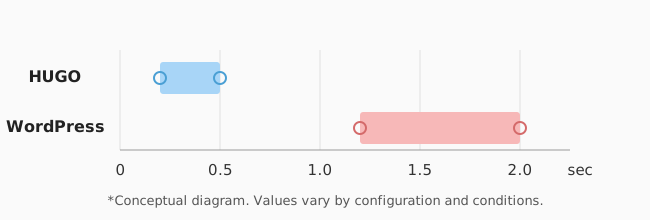
Ideal for Speed-Critical Sites
For corporate sites and campaign pages where display speed is important, HUGO’s static generation and CDN delivery provide effective acceleration. WordPress can also be improved by combining cache plugins and CDNs, but the risk of delays remains due to its dynamic processing architecture.
Conclusion: HUGO has a clear advantage over WordPress in “display speed” and “performance.” This positively affects user experience and SEO. HUGO is worth choosing especially when prioritizing fast initial display and stability during high traffic.
Security Comparison
Strengths of Static Sites (HUGO)
With HUGO, only static HTML files are placed on the server. No dynamic processing or databases are used. Thanks to this architecture, the attack surface from external threats becomes extremely narrow. For example, SQL injection, cross-site scripting (XSS), and malware infections through plugins are unlikely to occur. Risks of unauthorized access and data tampering are also greatly reduced. Static sites have “no entry points for attacks,” eliminating the need for WAF (Web Application Firewall) or complex update procedures.
Risks and Countermeasures for Dynamic Sites (WordPress)
WordPress core, themes, and plugins operate through dynamic processing like PHP. They also integrate with databases. Because WordPress is used worldwide, it’s a frequent target for attacks. In fact, attacks exploiting plugin vulnerabilities, theme flaws, brute force attacks on admin panels, and supply chain attacks have been reported. To use WordPress safely, various countermeasures must be combined: regular updates, backups, WAF implementation, access control, and removal of unnecessary plugins.
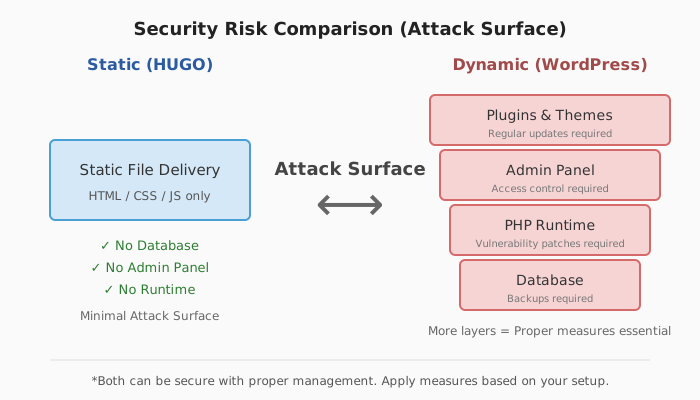
Selection Criteria
If you want to minimize administrative work and reduce security risks, HUGO is suitable. Conversely, if you want to frequently add features or actively use third-party extensions, operate WordPress while implementing thorough security measures.
Operational Costs and Maintainability
HUGO Operational Costs and Maintenance
HUGO is a static site generator that can significantly reduce operational costs. For example, you can use free hosting services like GitLab Pages, Netlify, or Vercel. The only required expense is the custom domain fee (approximately $10-15 per year). There’s no need to maintain servers or manage PHP and databases, so almost no maintenance work occurs. Security patches and update procedures are also unnecessary. Since HUGO consists only of static files, the resources needed for operation are minimal.
WordPress Operational Costs and Maintenance
WordPress is a CMS that dynamically generates pages, requiring a rental server contract that supports PHP and databases. When using major domestic servers, annual costs range from approximately $20-50 (including initial fees). Additionally, regular maintenance is required for WordPress core, plugin, and theme updates, backup operations, and security management. Neglecting these increases vulnerabilities, so continuous management is necessary.
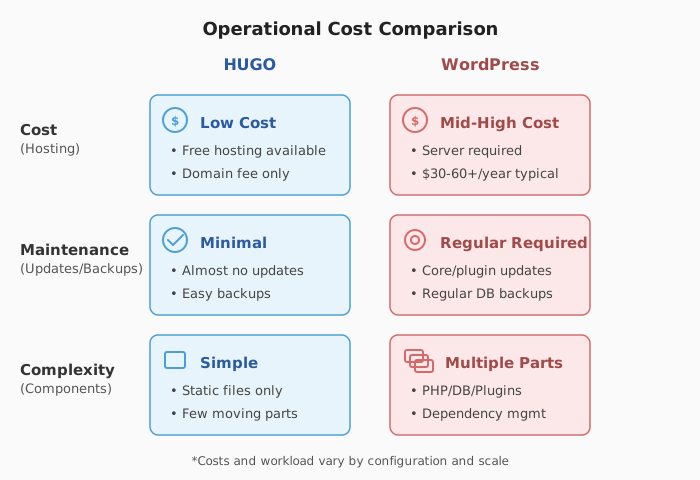
Selection Guidelines from Cost and Effort Perspectives
If you want to minimize server costs and operational effort, HUGO is convenient. WordPress is easy to extend and update, but costs and maintenance workload increase accordingly. When prioritizing operational resources and budget, HUGO’s simple configuration becomes an easy-to-use choice.
Differences in Extensibility and Customization
Code Flexibility and Development Knowledge Requirements
With HUGO, you can freely design layouts and features using template engines and custom themes. Since it’s a static site, you can implement unique features by combining JavaScript and API integrations. However, customization requires knowledge of HTML and Go templates. As of 2024, there are approximately 500 official HUGO themes, with the characteristic of being easy to modify in detail.
Abundance and Convenience of Plugins and Themes
WordPress has over 60,000 official plugins and more than 10,000 themes. Using these, you can add features and change designs without writing code. Just by adding plugins, you can immediately use many features like e-commerce, SEO optimization, form creation, and social media integration. With developers worldwide involved, there are also many third-party add-ons.
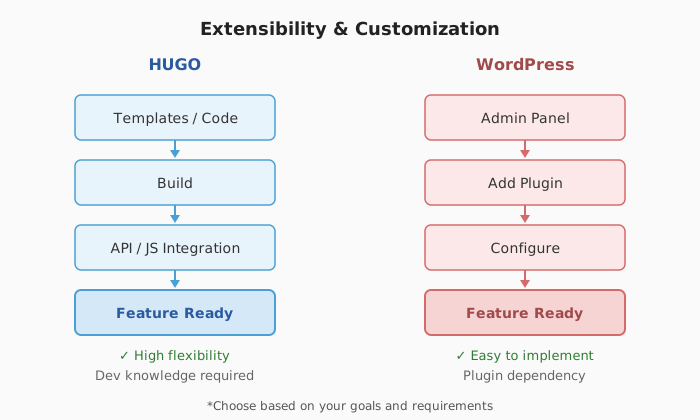
Selection Criteria
If you want unique designs and detailed customization through code, HUGO is suitable. On the other hand, if you want to quickly add features or change designs in a short time, WordPress extensions are convenient. As of 2024, WordPress holds about 60% of the CMS market, with many people appreciating its ease of adoption and extension.
HUGO has characteristics that make it easy for developers to customize in detail. WordPress allows easy addition of many features and designs without writing code. Choose based on your or your team’s technical capabilities and operational methods.
Differences in Content Creation and Management Experience
HUGO: Simple Workflow with Markdown and Version Control
With HUGO, you write articles using Markdown files. You organize and write content using a text editor. Created article files can be managed with version control systems like Git. This method makes it easy to trace article edit history and collaborate with others. When you want to add articles, change content, or publish, you simply update files and run commands to reflect changes. For engineers and those with development experience, this flow is easy to understand and work is efficient. However, inserting images into articles and previewing requires manual work or local environment setup, so non-engineers have more to learn initially.
WordPress: Intuitive Browser Management and Feature-Rich Editing Experience
With WordPress, you access the admin panel from a web browser. Using WYSIWYG editors or block editors (Gutenberg), you can create, edit, and publish articles clearly on screen. You can insert images by drag-and-drop and easily set links. Preview functions and scheduled publishing features are also available. Additionally, multiple users can edit simultaneously, making it suitable for team work. There are abundant features that anyone can use without programming or special knowledge.
Which Is More Suitable
HUGO suits organizations with engineers or development knowledge, or when you want to properly manage articles with version control. WordPress suits cases with frequent article updates, multi-person operations, or teams centered on non-engineer members. Differences in article creation and management methods are closely related to who operates and how articles are published.
Difficulty and Key Points for Implementation and Migration
Technical Requirements for HUGO Implementation and Operation
To start using HUGO, knowledge of command-line operations and version control with Git is required. Since HUGO automatically converts static sites to HTML, complex server or database configuration isn’t necessary. To efficiently manage articles and publishing work, we recommend setting up CI/CD (Continuous Integration/Delivery). Using AWS or GitHub Actions, you can automate content updates and publishing.
Key Points When Migrating from WordPress to HUGO
When migrating from WordPress to HUGO, there are several technical challenges and considerations:
- Data Conversion: WordPress articles and images are converted to Markdown format and static files using dedicated export or conversion tools (like WordPress to Hugo Exporter). Verify that converted data displays correctly without character corruption or image link issues.
- URL Design Review: Recreate the permalinks (article URL structure) used in WordPress for HUGO. Redirect settings and SEO considerations are also necessary.
- Reconsidering Dynamic Features: Since HUGO is a static site, dynamic features like comments, search, and form submissions cannot be used. If you want these features, integrate external services like Disqus or Algolia via JavaScript.
- Limited Japanese Information: Information about HUGO and migration work is primarily in English. Japanese resources are limited, so the ability to research English documentation may be necessary.
Summary of Implementation and Migration Difficulty
HUGO has simple file structure that’s easy to manage, but initial setup and migration work require higher technical skills than WordPress. WordPress is easy for beginners to handle, but when migrating, carefully verify database and plugin compatibility. To successfully migrate between HUGO and WordPress, proceed systematically with data conversion, URL design, and dynamic feature alternatives.
Why SmartWeb Uses HUGO and Use Cases
SmartWeb’s Rationale for Choosing HUGO
At SmartWeb, we use HUGO, a static site generator, to display websites faster, maintain solid security, and reduce operational costs. HUGO generates static HTML files when building websites. This mechanism makes web page initial display speed 4-10 times faster on average compared to dynamic CMS (measured with Google Lighthouse, WebPageTest, etc.). Additionally, since HUGO constructs websites with only static files, there’s almost no risk of vulnerability attacks on servers. There’s also data showing that malware incident reports decrease significantly compared to WordPress.
Use Cases and Implementation Benefits
At SmartWeb, we use HUGO for projects requiring “display speed,” “information protection,” and “cost efficiency,” such as corporate sites, landing pages, and information publishing sites where security is particularly important. Specifically, campaign microsites, small brand sites, and product introduction pages that aren’t frequently updated can be published quickly and at low cost. Combined with CDN, fast access is available from anywhere in the world, leading to improved SEO and user experience. Operationally, server and system maintenance work is significantly reduced, allowing efficient use of limited personnel.
In this way, SmartWeb leverages HUGO’s scientifically proven speed and robustness to build websites for various needs.
Summary and Selection Guidelines
HUGO and WordPress each have different characteristics. When deciding which to use, consider your objectives and operational methods.
- If you prioritize security, display speed, and operational costs, HUGO is suitable. HUGO is a static site generator with low cyber attack risks and very fast page display. Since it can be operated without servers, maintenance and costs are also reduced.
- If you prioritize ease of updates, feature additions, and operational simplicity, choose WordPress. WordPress allows immediate article creation and editing from the admin panel. Features can be easily added using plugins and themes.
Organize your site’s purpose, operational methods, required customization, and update frequency to choose the most suitable approach.
Related Posts

What is Hugo? Building Fast Websites for Small Business Marketing
A comprehensive guide to Hugo static site generator: features, pros and cons, and implementation. Le...

Beyond Accuracy: Why AI Chatbots Need Integrated Website Design
To maximize AI chatbot ROI, website integration is just as critical as response accuracy. We explain...

Want to Add AI to Customer Support, But Afraid of the Cost? — A Transparent Breakdown of Helpdesk AI Pricing
Helpdesk AI pricing is often opaque and hard to budget. We break down Zendesk, Intercom, Freshdesk, ...

